GitHub Copilot Pro: How I Unlocked the Disappeared Claude
The Frustrating Part After Upgrading to Pro
The free trial made it clear upfront that Claude wasn’t included — fine. Then GitHub abruptly ended all free trials, so I upgraded to Pro right away. Opened up the Copilot CLI, looked for Claude in the model picker and… nothing. Still not there.
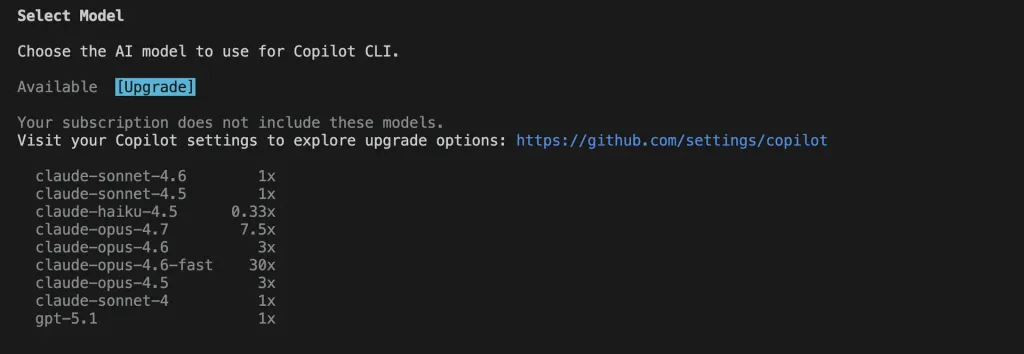
I figured it was a bug and opened a support ticket. That ticket proceeded to go completely unanswered.
The Accidental Discovery: It’s a Regional Block
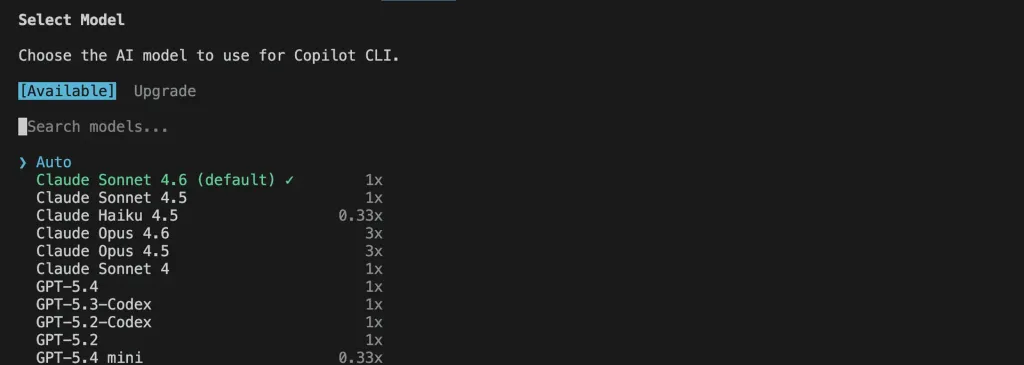
One evening I flipped on my VPN to buy some music, then opened GitHub out of habit. Suddenly — Claude appeared in the model selection menu. Just like that.
After all that waiting and a ghost support ticket, the answer was simple: Hong Kong and Macau are geo-blocked from using Claude on GitHub Copilot. It’s not a bug, it’s intentional — they just don’t tell you that.
Why “Just Use a VPN” Doesn’t Work for Me
The obvious fix would be to keep a VPN running. But my main dev machine is a Mac mini that’s also serving as a home server — it runs Tailscale and a bunch of Homelab services. Routing all traffic through a VPN permanently would create a mess of networking conflicts. Not worth it.
The Fix: tinyproxy on a Free Oracle Cloud VM
Here’s what actually worked — a clean, targeted solution that doesn’t touch anything else on my network.
Step 1: Run tinyproxy on an overseas VM
I used an Oracle Cloud Always Free VM. Install and start tinyproxy:
sudo apt install tinyproxy
sudo systemctl enable --now tinyproxy
Edit /etc/tinyproxy/tinyproxy.conf and add your local machine’s IP to the Allow list — by default it only allows 127.0.0.1.
Step 2: Set the https_proxy environment variable locally
In your shell config (~/.zshrc or ~/.bashrc):
export https_proxy=http://<your VM IP>:8888
export http_proxy=http://<your VM IP>:8888
The Result
Once that’s set, opencode and the Copilot CLI route their traffic through the proxy. GitHub sees the VM’s overseas IP, and Claude shows up in the model picker. Your browser and everything else on the machine is completely unaffected — only CLI tools that respect the https_proxy env variable go through it.
Wrapping Up
The whole thing boils down to an undocumented geo-restriction. GitHub didn’t announce it, support didn’t respond, and users are left to figure it out on their own. If you’re in Hong Kong or Macau and hitting the same wall, give tinyproxy a shot — it’s a five-minute setup and it won’t break anything else.